Effective Hourly Rate: How to Calculate What a Project Pays
Calculate an effective hourly rate for fixed-fee work with a simple fee ÷ hours formula, three labelled project examples, and a checklist for your next quote.
By Notion Business Planner by Cosmo Suite · Editorial policy
Published · 9 min read
Effective hourly rate is the project fee divided by the actual hours spent on that project. It is a retrospective measure: it shows the fee per hour after delivery and logged time are known. For a $1,200 project that takes 24 hours, the result is $50 per hour.
Use the result to compare similar services and review your next quote. It measures one project. It does not show take-home pay or tell you what the market charges. The examples below show the formula with labelled sample data, then explain which hours belong in the calculation.
Key takeaways:
- Effective hourly rate = project fee ÷ hours spent on that project.
- Count project-specific calls, delivery, revisions, and handoff time if you want the full project rate.
- Keep the fee basis consistent and track money received separately from unpaid invoices.
- The simple rate is before business expenses and tax.
Effective Hourly Rate at a Glance
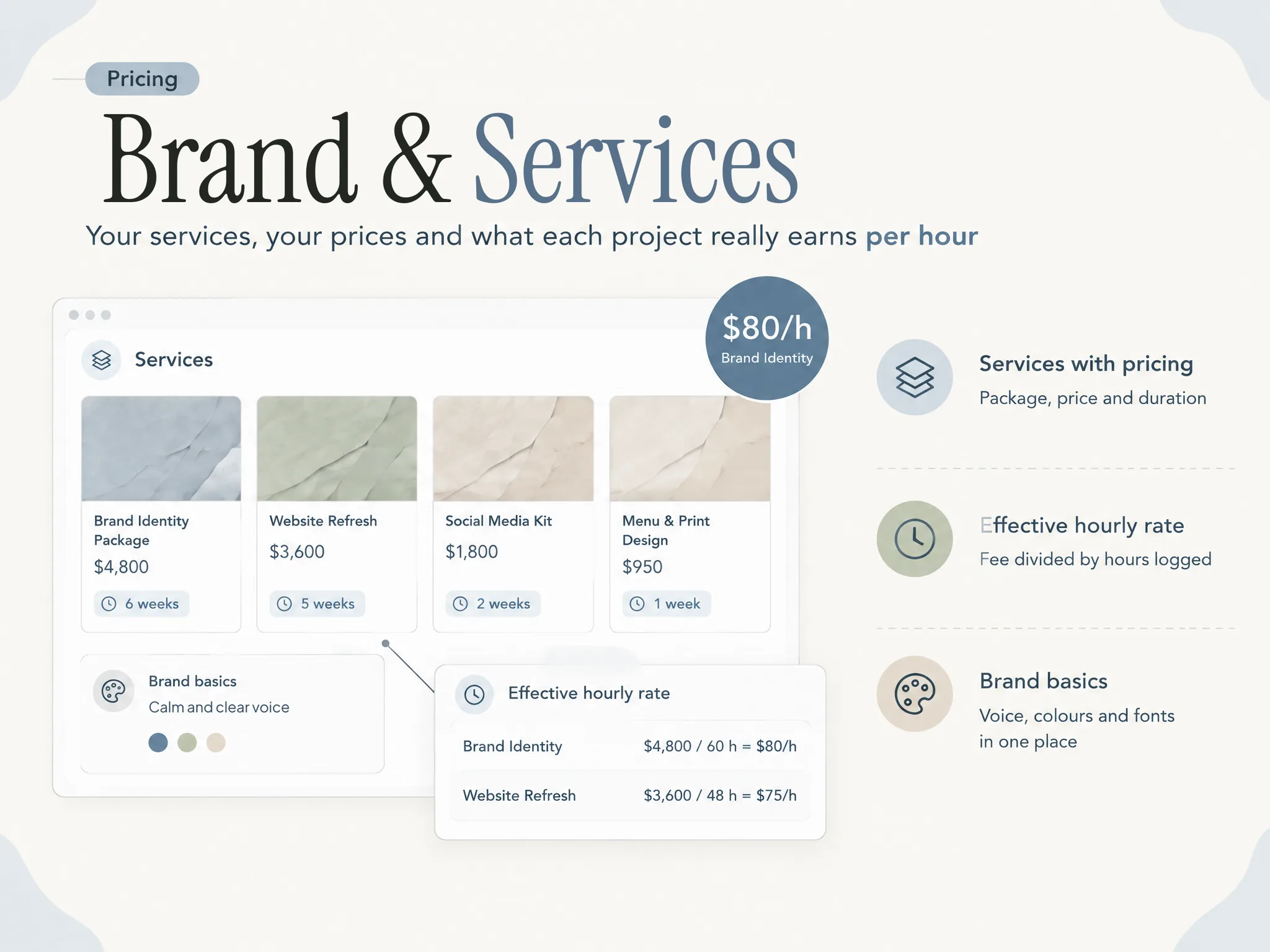
For fixed-fee work, divide the agreed project fee by all hours assigned to the project. Two rows match the sample calculations on Notion Business Planner's Brand & Services page. The third row is a separate, clearly marked calculation example.
| Sample project | Fee | Project hours | Effective hourly rate |
|---|---|---|---|
| Brand Identity Package | $4,800 | 60 | $80/hour |
| Website Refresh | $3,600 | 48 | $75/hour |
| Menu & Print Design | $950 | 20* | $47.50/hour |
The first two fee and hour pairs, and their displayed rates, match the sample calculations in the product image. The third row uses the sample package price shown there; its 20 hours are an assumed input for demonstrating the formula. These are template examples. They do not report customer results or market benchmarks.
If the Brand Identity Package took 60 hours from kickoff through delivery, then $4,800 ÷ 60 = $80 per hour. The Website Refresh took 48 logged hours, so $3,600 ÷ 48 = $75 per hour. A lower result is a reason to review the time, scope, and project conditions before quoting similar work again.
Quoted hourly rate is the amount agreed for each billable hour before work begins. When a fixed-fee quote states one total rather than an hourly fee, its implied hourly rate becomes visible only after you record the work. If the agreed scope and fee stay fixed while a project takes longer than planned, the actual-hour denominator grows while the fee does not. That difference is why a quote estimate and an effective rate should be recorded separately.
The division itself is quick. Choosing inputs that describe the same job takes more care. Use the fee agreed for that scope and the hours tied to delivering it. If two projects share a service name but have different deliverables, calculate them separately first. Combining them can hide which scope took longer. Keep the underlying fee and time figures in your record, then display the rate with the same rounding approach each time.
Which Hours Belong in the Calculation?
Include the time that went into the project, not only the hours a client can see. For a fixed-fee service, that may include the kickoff call, research, preparation, production, project-specific messages, revisions, and handoff. Keep a clear rule for when the clock starts and stops, then use that rule across comparable projects. If a project begins with a planning call or research before the main deliverable, decide whether that time belongs to the project and apply the choice consistently. A proposal written before the client agrees may be better tracked as sales time. If you want to understand the effort required to win work, review that time separately.
Short interruptions can be hard to record exactly. Add a time entry soon after the work, or mark an estimate as an estimate. A rough but honest record is easier to interpret than a precise-looking total that leaves out calls and revisions. Keep the note short: what you did and which project it served.
A short log such as “design: 9 hours” may be enough for a small job. For a longer project, separate the main work from meetings and revisions. Those entries can show where the hours went when a final rate looks lower than you expected.
General business time needs a separate choice. Time spent marketing, bookkeeping, or learning a tool does not belong to one project unless you are deliberately allocating it. For a project rate, keep unrelated admin out. For a business-wide rate, compare the revenue for a period with all of the working hours in that period. State which question you are answering before you divide.
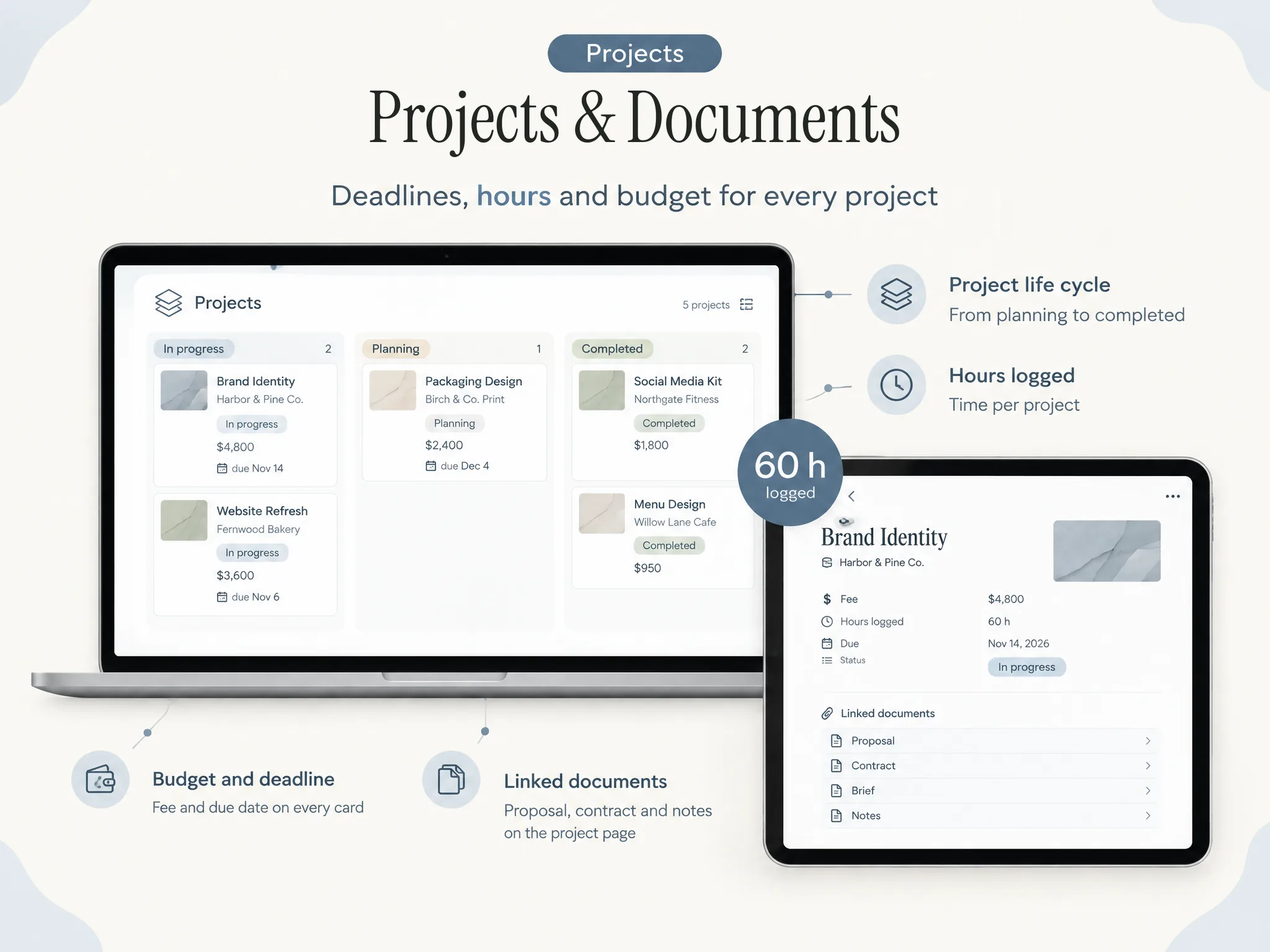
The Projects & Documents page in Notion Business Planner is designed to hold a project’s budget and logged hours. Connect each time entry to the project it belongs to, then total those entries when the work ends.
Keep the Fee and Payment Basis Consistent
The agreed project fee helps you assess the price against the work delivered. The payment received answers a different question: how much cash has arrived. Do not treat an unpaid invoice as received money, and do not compare one project’s contracted fee with another project’s partial payment. If a client changes the scope, record the agreed change and the extra hours against that work. Otherwise a later review may make the original price appear to cover tasks that were added afterward.
Discounts and refunds also change what a project brought in. Choose whether your comparison uses the agreed fee or the amount retained after a change, then label that basis. The important point is to compare like with like. Keep payment dates and unpaid balances in their own records so a pricing review does not get mistaken for a cash summary.
For example, a $1,200 fixed-fee project with 24 hours of work has a $50 project rate once you use the agreed fee. If the client has paid only a deposit so far, note the balance separately. When reviewing cash received, use payments that have actually arrived and label the result as a cash-based view.
The simple formula also does not subtract project costs, business overhead, or tax. It compares a fee with hours, so it cannot show the money left after operating costs. The IRS recordkeeping guidance says a record system should show income and expenses, with documents such as invoices and receipts supporting entries. Keep those financial records separate from a project-rate calculation.
For U.S. federal tax information, consult the IRS guidance on self-employment tax. This article does not provide tax, accounting, or legal advice. The project rate is one pricing record, not a tax figure.
How to Calculate an Effective Hourly Rate After a Project
Use the same five steps after each fixed-fee project. A consistent record makes comparisons more useful than trying to remember how long a job took weeks later.
- Choose a completed project. Use one service and one agreed scope. Do not combine unrelated projects in the same calculation.
- Add the project hours. Include the work covered by your time-tracking rule, including project-specific communication and revisions.
- Choose the fee figure. Use the agreed fee to review pricing against scope. Track payments separately for cash flow.
- Divide the fee by the hours. Keep the currency and units clear. A fee of $900 divided by 18 project hours equals $50 per hour.
- Record the context. Note the service, scope, number of revision rounds, and anything that explains an unusual result.
A project page with a fee, budget, and hours can keep the inputs together. Add a short note for the service, agreed scope, fee basis, and any revision work that affected the total. When a similar project comes in, you can compare its rate with the earlier work and see whether the difference came from time, price, or scope.
If you use a paper log or spreadsheet, the same fields are enough to start: project name, service, fee, hours, completion date, and a note about changes. You do not need a complex system to make the calculation. You do need a record you will update while the work is still fresh. The Notion Business Planner includes project pages for budgets and logged hours, while its Brand & Services page lists services with pricing and an effective hourly rate. A spreadsheet can do the same calculation if you prefer to keep your own records there.
What to Do With a Low or High Result
Use one effective hourly rate to inspect the project. It does not settle whether the whole service works for your business. Compare work with similar scope and keep the hours and fee basis consistent.
| What you see | What to check next |
|---|---|
| The rate is below your own target | Look for unplanned revisions, unclear scope, or time you did not log at first. |
| Similar projects keep coming in low | Adjust the next quote, define the included work more clearly, or change the delivery process. |
| The rate is above your target | Check that the scope and quality still match what you promised. Compare with similar work before changing your prices. |
| Results vary from project to project | Separate projects by service or scope so one unusual job does not hide the pattern. |
Missing hours can make a rate look higher. A reduced scope can also produce a lower value. Compare the number with the project record before changing a quote. Read the number alongside the project record and your own goals. It cannot tell you what another freelancer should charge.
Break-even point is the sales level at which total costs and total revenue are equal, as the SBA guide explains. The guide's formula includes fixed costs, service price, and variable costs. The SBA calculator also asks for expected unit or service sales. That analysis answers a broader question than project fee per hour: whether expected sales cover business costs.
When a result surprises you, trace it back to the work. Check whether the planned scope changed, whether a revision took longer than expected, or whether the hours were logged under another project. Then decide what to change on the next similar job. That might mean clarifying the included deliverables, setting a review point with the client, or changing your quote. Keep the decision tied to what happened, rather than reacting to one number in isolation.
For a broader view of where your service prices fit, start with a one-page freelance business plan. To review projects, hours, invoices, and the coming week together, see the guide to one-person business tracking.
A Simple Notion Setup for Project Rates
Keep the service price and completed-project hours close enough to compare. A service list can hold the offer and its price. A project record can hold the agreed fee, hours, scope, and completion status. When the project is done, divide the fee by its logged time and add the result to the service review.
Notion Business Planner has a Brand & Services page that shows service pricing and sample hourly-rate calculations. Its project pages show budgets and logged hours. The Notion Business Planner template brings those pages into one business-planning workspace, but the formula works in any tool you keep up to date.
How These Examples Were Checked
The Brand & Services product image displays the sample calculations $4,800 ÷ 60 hours = $80 per hour and $3,600 ÷ 48 hours = $75 per hour. The arithmetic was recalculated on 19 October 2026. The Menu & Print Design row uses the displayed $950 sample fee and an assumed 20 hours, which produces $47.50 per hour; the image does not show those hours or that rate. All three rows are sample data, not client outcomes.
The rate measures a project fee against recorded hours. It does not account for expenses, tax, unpaid balances, or the amount of work you do outside the project. Use it as one record when reviewing your pricing, not as a promise about income.
If you want service prices and project hours in one place, Notion Business Planner includes Brand & Services and Projects pages. You can also keep the same fields in a spreadsheet: fee, hours, effective rate, and a note about scope. Notion Business Planner by Cosmo Suite publishes this article. See the site’s editorial policy and about page for its correction and contact details.
Frequently asked questions
How do you calculate an effective hourly rate?
Divide the fee for a completed project by the total hours you spent on that project. Keep the fee and hours on the same project and use the same method each time.
What is a good effective hourly rate for a freelancer?
There is no single rate that suits every freelancer. Compare your result with the income target and costs for your own business, and treat one project as a data point rather than a market benchmark.
Should I include revisions in my project hours?
Yes, include revisions and other work tied to the project if you want the rate to reflect the full time the work took.
Does an effective hourly rate show take-home pay?
No. The simple project formula uses the project fee before business costs and tax. It does not show take-home income.
Do I use the invoice amount or the payment received?
Use the agreed project fee to assess the price against the hours. Track payments separately if you want to know how much cash has arrived. Keep the same basis when comparing projects.
How often should I review my effective hourly rate?
Calculate it when a fixed-fee project is complete, then compare similar projects over time. A weekly or monthly review can help you notice patterns in scope and logged hours.
Sources
Keep reading
Money and Pricing
Billable Hours vs Non-Billable Hours: Log Both When You Work Alone
Billable hours are only part of your week. Log billed, absorbed and non-billable time, then see what an hour of work really pays, with a worked example.
· 8 min read
Money and Pricing
Freelance Rates: How to Set Yours From Costs and Target Income
Freelance rates need a floor your own costs set and a market check you can verify. See how to reconcile the two, quote the result and review it.
· 10 min read

Money and Pricing
Value Based Pricing for a Service Business: A Practical Method
Value based pricing for a service business starts with the result a client wants. Then you check the scope, evidence, and delivery risks before quoting.
· 9 min read
